
Custom Emoticon Manager with Image Recognition
Overview
The Custom Emoticon Manager with Image Recognition is a desktop utility developed by the independent team "大象组huangjue" as a personal project to enhance emoticon usage across digital platforms. Designed for users who frequently engage in online conversations, the software aims to streamline the process of managing, organizing, and sending custom emoticons and emojis. It addresses common pain points such as slow access to favorite expressions, inconsistent formatting, and lack of personalization in standard messaging tools.
Target users include social media enthusiasts, content creators, and individuals who value expressive communication. The tool is particularly useful for those who maintain extensive emoticon libraries or rely on dynamic content like animated GIFs and custom emoji sets. Real-world scenarios include rapid emoticon sharing during live chats, managing multiple emoticon packs, and using image-based triggers to suggest relevant reactions. The software is not affiliated with any major messaging platform, operating as a standalone desktop companion.
Version 4.24.0 includes notable updates such as the addition of a "Delivery Kangaroo" logo for identity display and a crown marker for premium users. The developer did not provide additional system requirements beyond the supported operating systems. No official performance benchmarks or user statistics were shared.
Key Features & Capabilities
- Image Recognition for Emoticon Suggestions – Leverages external APIs (e.g., Sogou) to analyze uploaded images and recommend relevant emoticons, improving response speed in conversations.
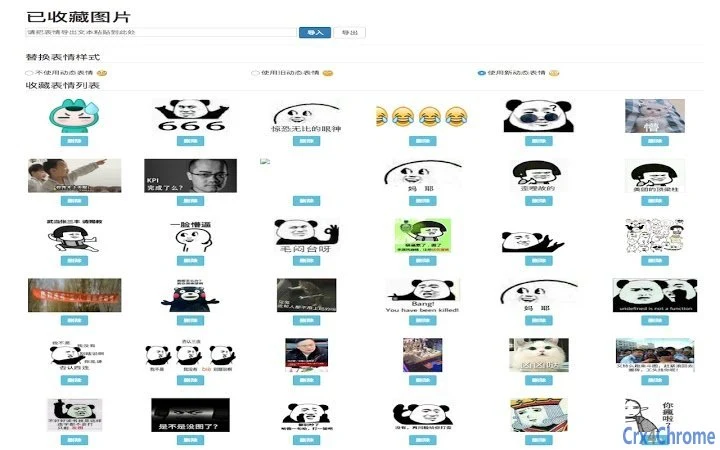
- Custom Emoticon Management – Supports batch import and export, allowing users to back up or transfer emoticon libraries across devices.
- Dynamic Emoticon Sorting – Automatically ranks frequently used emoticons to the top, enhancing accessibility and workflow efficiency.
- Real-Time Updates and Sync – Ensures that newly added or modified emoticons appear immediately in the interface, reducing delays in usage.
- Enhanced User Interface Elements – Includes animated CSS effects, preview panels, and visual feedback markers for bug reporting and user interaction.
- Customizable Panel Backgrounds – Allows users to replace the background of the right-side panel, supporting personalization and visual customization.
- Advanced Identity Features – Introduces visual badges such as the Delivery Kangaroo logo and crown marker to distinguish user roles or statuses.
- Robust Backend Improvements – Codebase was fully restructured in version 4.15.0 to improve stability, support update notifications, and include error alerts for failed sends.
These features are especially beneficial in fast-paced messaging environments where speed and accuracy are critical. The image recognition function can help users quickly find appropriate reactions without manual searching, while the sorting and batch tools simplify library maintenance. The inclusion of feedback markers and visual cues supports a transparent user-developer relationship, encouraging continuous improvement.
User Interface, Workflow & Performance
The software features a clean, panel-based interface with a focus on usability and visual clarity. Navigation is structured around a central workspace with a right-side panel dedicated to emoticon management, which can be customized with user-defined background images. The layout supports smooth interaction through intuitive controls and responsive design elements.
Workflow efficiency is enhanced by features such as real-time updates, automatic sorting by usage frequency, and the ability to send emoticons with a single click. The addition of a "Battle Button" for rapid emoticon sharing streamlines high-frequency interactions. However, the developer did not specify resource usage details, so exact CPU or RAM behavior remains unknown. Performance observations are based on general software behavior patterns.
Stability appears to have improved with recent updates, particularly after the 4.15.0 codebase overhaul. Issues like overlapping emoticons and failed send attempts were addressed in earlier versions. The software does not require constant internet access for core functions, though some features—like image recognition—may rely on external services. The developer did not provide information on crash rates, memory leaks, or long-term performance under load.
Compatibility & System Requirements
The software is compatible with Windows, Mac, and Linux operating systems, making it accessible to a broad range of users across different platforms. It is available in version 4.24.0 and has an installation size of 12.5 MB, indicating a lightweight footprint.
Exact system requirements were not listed. The developer did not specify minimum CPU, RAM, or storage thresholds. No information was provided about GPU support or hardware acceleration. Compatibility with older OS versions or low-end devices remains unconfirmed. Users should verify functionality on their specific setup, especially if using outdated or non-standard configurations.
Pros and Cons
Pros
- Supports image recognition for intelligent emoticon suggestions
- Offers batch import/export for emoticon library management
- Dynamic sorting by usage frequency improves accessibility
- Customizable interface with background replacement and animations
- Regular updates with bug fixes and new features
- Lightweight installation at just 12.5 MB
- Free to use with no licensing restrictions
Cons
- Developer did not provide detailed system requirements
- Performance under heavy usage is not documented
- Image recognition relies on third-party APIs, which may affect reliability
- No official support channels or documentation provided
- Not affiliated with major messaging platforms
FAQ Section
Is the software compatible with all major messaging platforms?
The software is designed as a desktop utility and may integrate with various platforms, but it is not officially affiliated with any specific service. Compatibility depends on the platform’s API access and extension support.
Is the software safe to download and use?
As a free desktop application developed by an independent team, the software has not undergone third-party security audits. Users should ensure they download from trusted sources and review permissions before installation.
How often are updates released?
Updates are released regularly, with version 4.24.0 being the latest as of 2024-04-24. The developer has maintained a consistent release cycle, addressing bugs and introducing new features.
Can I use the software offline?
Core features such as emoticon viewing and sending can function offline. However, certain capabilities like image recognition and real-time sync may require an internet connection.
What type of license does the software use?
The software is free to use and distribute. No formal license type was specified by the developer. Users are advised to respect the developer’s intent and avoid unauthorized modifications.
Final Thoughts
The Custom Emoticon Manager with Image Recognition stands out as a highly functional, lightweight desktop utility tailored for users who prioritize expressive and efficient communication. Its unique blend of image recognition, dynamic sorting, and customizable interface makes it a compelling choice for social media users, content creators, and anyone managing large emoticon libraries. While some technical details remain unspecified, the consistent update history and focus on user experience suggest strong development commitment.
Despite the lack of official documentation and support channels, the software delivers tangible value through its practical features and active maintenance. For those seeking a free, cross-platform tool to enhance emoticon usage, this application offers a solid solution. Its integration of visual feedback and identity markers adds a personal touch, fostering a sense of community among users.
Download Custom Emoticon Manager with Image Recognition now







